MTA-STS Explained: Why Your Domain Needs It
Learn what MTA-STS does, why it matters for email security, and how to set it up in under 30 minutes.
Stekpad Team
Email Deliverability Experts
What MTA-STS Solves: TLS Downgrade Attacks
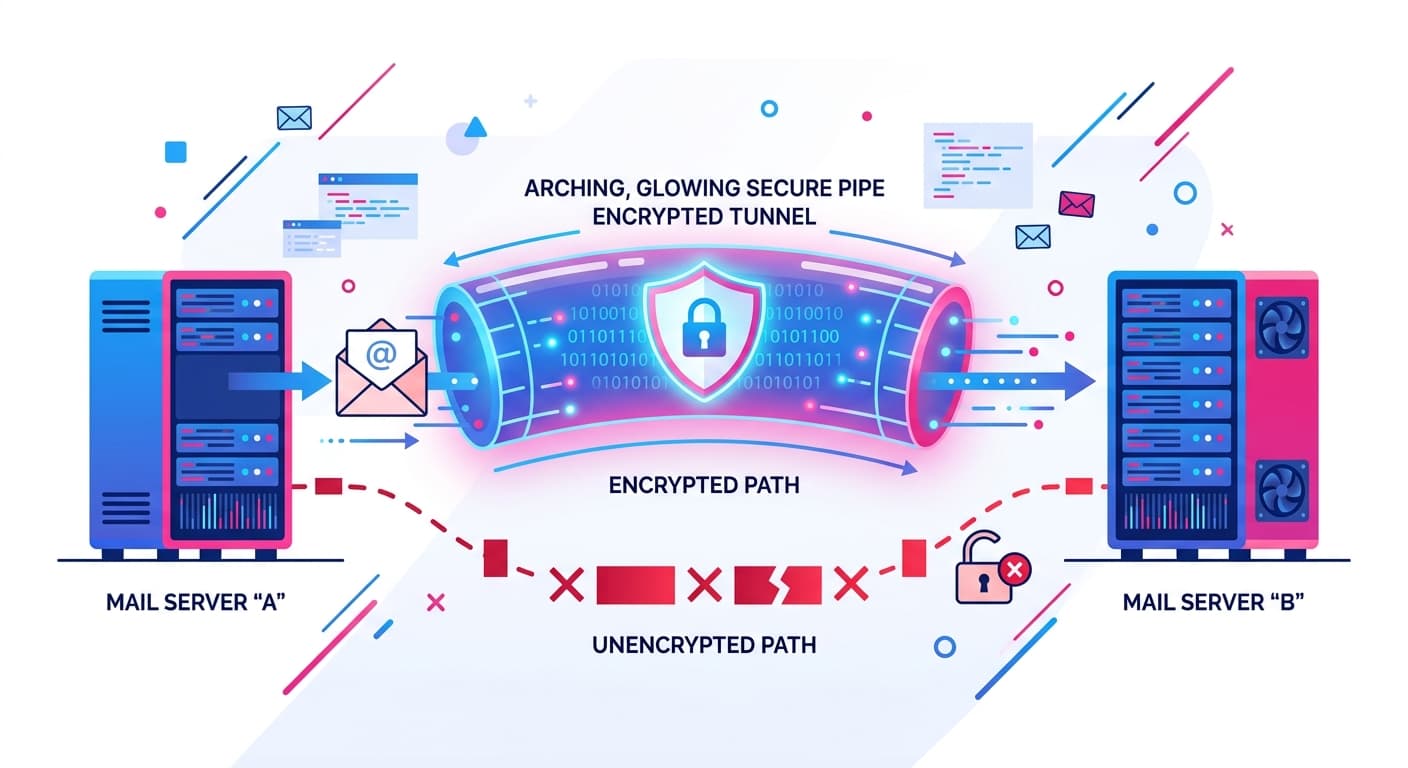
"MTA-STS (Mail Transfer Agent Strict Transport Security) closes a critical security gap that SPF, DKIM, and DMARC cannot address: the possibility that email being delivered to your domain can be intercepted by forcing an unencrypted connection." Without MTA-STS, when another mail server delivers email to your domain, it negotiates TLS encryption through a process called STARTTLS. The fundamental problem with standard STARTTLS is that it is opportunistic — if the TLS negotiation fails for any reason, mail servers are designed to fall back to delivering the email unencrypted rather than failing the delivery. An attacker positioned between the sending mail server and your mail server can deliberately interfere with the TLS handshake, forcing delivery over an unencrypted connection — a TLS downgrade attack.
TLS downgrade attacks on email are not theoretical. Security researchers have documented active man-in-the-middle attacks on SMTP that exploit the opportunistic fallback behavior of STARTTLS. These attacks can expose the full content of emails, including sensitive business communications, credentials, and confidential documents. They are particularly effective against targeted attacks where an adversary controls network infrastructure between specific senders and recipients — a realistic scenario for government, enterprise, and high-value target organizations.
The absence of certificate validation in standard SMTP delivery compounds the risk. Even when TLS is negotiated successfully, a standard SMTP server delivering email to your domain does not verify that your mail server’s TLS certificate is valid and issued by a trusted CA for your domain. An attacker with a fraudulent certificate (or using a self-signed certificate) can intercept encrypted email that the delivering server believes is securely delivered. MTA-STS solves both problems simultaneously: it requires TLS and validates the certificate, with no fallback to unencrypted delivery allowed.
"MTA-STS is the HTTPS equivalent for email server-to-server delivery: it mandates encrypted transport and validates the certificate, making both eavesdropping and certificate spoofing attacks impossible for compliant sending servers." Major email providers — Google, Microsoft, Yahoo — all support MTA-STS as both senders and receivers. When these providers deliver email to your domain, they will check for and honor your MTA-STS policy. For email security and compliance teams evaluating frameworks like SOC 2, ISO 27001, and HIPAA, MTA-STS is increasingly recognized as a required email security control.
How MTA-STS Works: DNS Record and Policy File
MTA-STS works through two components that together define your policy: a DNS TXT record that announces the policy exists and a policy file hosted on your web server that specifies the details. The separation between DNS announcement and web-hosted policy is intentional — it means your policy file can be updated without a DNS change (important for fast updates), and it allows the policy to include parameters too long for a DNS TXT record.
The DNS TXT record is published at _mta-sts.yourdomain.com and takes the form: v=STSv1; id=20260301T000000Z. The v= field specifies the MTA-STS version (currently always STSv1). The id= field is a unique string that changes whenever you update your policy — sending servers cache your MTA-STS policy and use the id= field to determine whether they need to re-fetch the policy file. Every time you change your policy file, you must also change the id= value in your DNS record to signal to cached clients that an update is available. A common convention is to use a timestamp in the YYYYMMDDTHHMMSSZ format.
The policy file is a plain text file hosted at https://mta-sts.yourdomain.com/.well-known/mta-sts.txt. This requires your domain to have a subdomain mta-sts.yourdomain.com with a valid TLS certificate and a web server that can serve files. The policy file content looks like: version: STSv1 followed by mode: enforce (or testing or none), mx: mail.yourdomain.com, and max_age: 86400 (in seconds). The mx: lines specify which mail server hostnames are authorized to receive mail for your domain — any delivery to an unlisted or certificate-mismatched server is rejected under enforce mode.
Three MTA-STS policy modes provide a deployment path analogous to DMARC’s none/quarantine/reject progression. mode: testing instructs sending servers to check the policy and report violations via TLS-RPT (described below) but not block delivery. This is the monitoring phase: you see where deliveries would be blocked without affecting actual email flow. mode: enforce activates full policy enforcement: sending servers must establish valid, verified TLS to your listed MX servers or refuse delivery. mode: none signals that your policy is disabled but cached copies should be invalidated — useful for graceful policy retirement. Always start with mode: testing before advancing to enforce.
Step-by-Step Setup
Step 1: Set up the mta-sts subdomain. Create a DNS A record for mta-sts.yourdomain.com pointing to a web server you control, or configure it as a CNAME to a hosting platform. Obtain a valid TLS certificate for this subdomain from a trusted CA — Let’s Encrypt is free and widely accepted. Your web server must be configured to serve HTTPS on port 443 for mta-sts.yourdomain.com before proceeding.
Step 2: Create and publish the policy file. Create a text file named mta-sts.txt with the following content: version: STSv1, mode: testing, an mx: line for each MX server hostname your domain uses, and max_age: 86400. Verify your MX hostnames from your DNS MX records — these must match exactly. Upload the file to /.well-known/mta-sts.txt on your web server. Verify it is accessible at https://mta-sts.yourdomain.com/.well-known/mta-sts.txt in a browser — the content type must be text/plain.
Step 3: Publish the MTA-STS DNS TXT record. In your DNS management console, add a TXT record at _mta-sts.yourdomain.com with value: v=STSv1; id=20260301T000000Z (use the current date as the id). Allow DNS propagation (typically 15 minutes to 2 hours for most providers). Verify propagation using a DNS lookup tool or Stekpad’s MTA-STS Checker.
Step 4: Configure TLS Reporting (TLS-RPT). TLS-RPT is a complementary protocol that instructs sending servers to report MTA-STS policy failures and TLS negotiation errors to you. Add a TXT record at _smtp._tls.yourdomain.com with value: v=TLSRPTv1; rua=mailto:tls-reports@yourdomain.com. This works exactly like DMARC aggregate reports — you receive JSON reports showing delivery attempts, TLS versions used, and any policy failures. "TLS-RPT reports during testing mode give you complete visibility into which senders are checking your MTA-STS policy and which delivery attempts would fail under enforce mode — they are essential for validating your setup before enforcing."
Step 5: Review testing mode reports and advance to enforce. After 1-2 weeks in testing mode, review your TLS-RPT reports. Confirm that major providers (Google, Microsoft, Yahoo) are correctly resolving your policy and establishing valid TLS to your mail servers. If any legitimate delivery failures appear in the reports — for example, a mail server using a certificate that does not match your listed MX hostname — investigate and fix before advancing. When reports show clean TLS delivery from all major providers, update your policy file to mode: enforce and increment the id= value in your DNS TXT record.
Testing with Stekpad MTA-STS Checker
Stekpad’s MTA-STS Checker performs end-to-end validation of both components of your MTA-STS setup. It checks your DNS TXT record for correct syntax, verifies the id= value is present and properly formatted, confirms the _mta-sts subdomain resolves with a valid HTTPS endpoint, fetches and parses your policy file, validates the policy file syntax (version, mode, mx, max_age fields), checks that your listed MX hostnames match your domain’s actual MX records, and verifies that each listed MX server’s TLS certificate is valid and covers the expected hostname.
Common failure modes the checker identifies include: the policy file returning a non-200 HTTP status code, the mta-sts subdomain TLS certificate not covering the subdomain (a common mistake when using wildcard certificates that do not cover bare subdomains), MX hostnames in the policy file that do not match the actual MX records in DNS, and policy mode still set to testing after the intended switch to enforce. Each failure mode has distinct implications for email delivery under enforcement — use the checker after every configuration change to confirm each component is correct before TLS-RPT reports surface problems.
The max_age parameter in your policy file controls how long sending servers cache your policy. A max_age of 86400 (24 hours) means cached policies expire daily and servers re-fetch the current policy frequently — good for active deployments where you may update the policy. A longer max_age of 604800 (7 days) or 2592000 (30 days) reduces the load on your policy hosting server and is appropriate for stable, mature deployments. "Set max_age to 86400 during testing and initial enforcement, then increase to 604800 or higher once you have confirmed your policy is stable and all MX server certificates are current and properly configured." Stekpad’s Domain Health dashboard monitors your MTA-STS policy file accessibility, your TLS certificate expiration for the mta-sts subdomain, and your MX server certificate validity — alerting you in advance of any expiration that would cause delivery failures under enforcement mode.
MTA-STS pairs naturally with the rest of the email authentication stack. SPF and DKIM authenticate the message origin and integrity. DMARC enforces policy on authentication failures and provides reporting. BIMI turns authentication excellence into visible brand trust in the inbox. MTA-STS secures the transport layer — the physical delivery of email to your mail servers. Together, these four standards represent the complete 2026 email security posture for a domain that takes deliverability and security seriously. Stekpad’s Domain Health dashboard monitors all four simultaneously, giving you a unified view of your complete authentication and transport security posture with continuous automated validation. Once your transport security is in place, the next step is building sender reputation through gradual volume increases — see our warm-up schedule templates for a day-by-day ramp-up plan to pair with your secure infrastructure.
Get deliverability tips in your inbox
Join 2,000+ email professionals who receive our weekly newsletter with actionable tips on improving inbox placement, sender reputation, and email authentication.
No spam. Unsubscribe anytime. We practice what we preach.